Guide — the universal method
How to download an SVG from any website
A modern page hides its vectors where Save image as… can't reach them. This is the method that gets every one — the original markup, sharp and editable, not a screenshot.
The four hiding places
Where SVGs actually live on a page
Before the method, it helps to know why the obvious approach fails. An SVG on a web page is almost never a plain image.svg you can open in a new tab. It's usually one of four things, and each one defeats the browser's save menu in its own way.
- Inline
<svg>. The markup is drawn directly into the HTML. There's nosrcand no image URL, so the right-click menu offers nothing. This is how most icon systems ship today. See inline SVG. - CSS
background-image. The vector is set in a stylesheet — sometimes as a file, often as an inlinedata:URI. The browser treats it as decoration, not a saveable image. See CSS background SVG. - Sprite
<use>references. One hidden sprite holds many icons; each place they appear is just a<use>pointer. Saving the pointer gives you nothing usable. See sprite extractor. <img>and<object>sources. The friendliest case — but even here the source can be adata:URI the save menu mangles, or a cross-origin URL that downloads with the wrong name.
The universal method — five steps
SVG Downloader ignores the distinction between those four cases. It reads the live page, resolves each source to real SVG markup, and hands you a file. The whole run is about two minutes the first time and a few seconds after that.
- Install the extension. Add SVG Downloader to Chrome, Edge or Brave (Chrome 88+). It's free, MIT-licensed, and nothing about it phones home.
- Open the popup on the page. Navigate to the page holding the SVG you want, then click the toolbar icon to open the popup.
- Let it scan. The extension walks the DOM and collects the vectors it finds — inline elements, CSS backgrounds, same-document sprite references and image sources, including
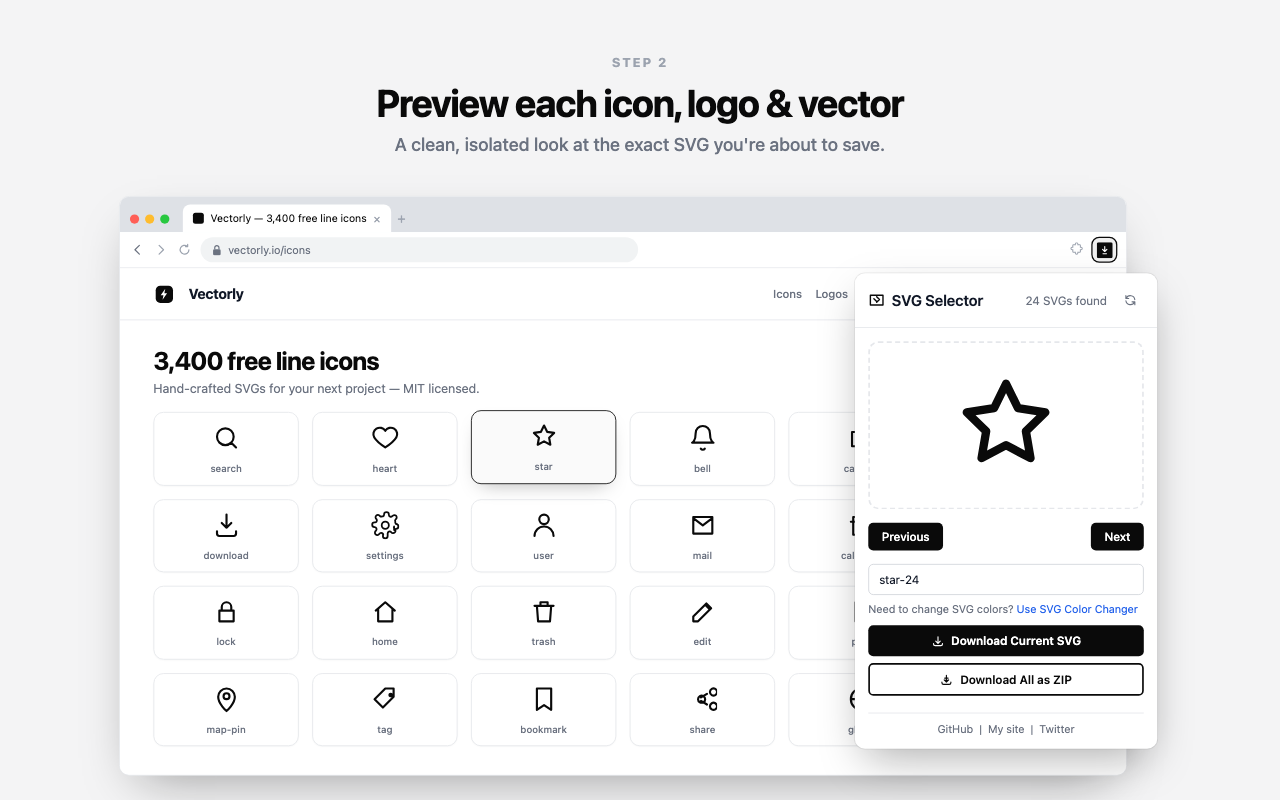
data:URIs. - Preview and pick. Each SVG appears in an isolated preview so you see it clean, off the busy page. Use Previous and Next to page through, and type a filename if you care what the file is called.
- Download. Click Download Current SVG for the one on screen — under the filename you typed, or a numbered
svg-1.svgif you left the field blank — or Download All as ZIP to take the whole set at once, de-duplicated and numbered, with anything that couldn't be resolved named in the popup's status line.
Why not just right-click?
Right-click Save image as… only appears for things the browser classifies as images with an address it can fetch: an <img> with a URL, a canvas, sometimes a CSS background. Three of the four sources above aren't that. Inline SVG has no URL. A sprite <use> resolves to a fragment of a document. A data: URI background is a string in a stylesheet. Even when the menu does appear, it often saves a re-rendered raster or a file named download.svg with a broken namespace. Reading the DOM sidesteps all of it and returns the actual vector.
Two things that trip people up
Two results surprise first-time users, and both are expected behaviour, not bugs.
- The file wouldn't open before — now it does. Inline SVG usually omits the
xmlns="http://www.w3.org/2000/svg"namespace because the HTML parser supplies it. Copied to a bare file, that SVG won't open. SVG Downloader repairs the missingxmlnson the way out, so its files open in Figma, Illustrator, VS Code and every browser. - The icon looks black. Many icons inherit their colour from CSS via
currentColor, so the standalone file has no colour of its own and renders black. That's the true markup. If you need a specific colour locked in, use the optional hand-off to the SVG Color Changer, recolour, then save.
- Works on
- Chrome 88+, Edge and Brave. Any page you can open — inline, CSS, sprite and image sources.
- Output
- The original vector markup, namespace repaired, resolution-independent and recolourable.
- Privacy
- 100% on-device. No server, no account, no upload, no analytics.
- Next
- Grabbing a whole set? See extract SVG icons and download all as ZIP.
Good to know
Frequently asked
Why can't I right-click and save an SVG?
Most SVGs on a modern page are inline markup, CSS backgrounds or sprite references — none of which the browser treats as a saveable image. There's no URL behind them, so Save image as… never appears or is greyed out. SVG Downloader reads them from the DOM instead.
Does it work on every website?
It works on any page you can open in Chrome 88 or later, Edge or Brave. It detects inline SVG, <img> and <object> sources including data: URIs, CSS background-image SVGs and same-document sprite <use> references. It can't reach content behind a login you don't have or served from a domain the page never loads.
Why is my downloaded icon black instead of coloured?
Many inline icons inherit their colour from CSS using currentColor, so the standalone file has no colour baked in and renders black. That's the true source markup. To lock a colour in, hand the file off to the SVG Color Changer and recolour it, then save.
The SVG I saved won't open — what's wrong?
A standalone SVG needs an explicit xmlns namespace that inline markup usually omits. SVG Downloader repairs the missing xmlns automatically, so its files open in Figma, Illustrator, VS Code and every browser without editing.
Is the SVG uploaded to a server?
No. Everything runs on-device inside your browser. There's no server, no account, no upload and no analytics — the vector never leaves your machine.
Is it really free?
Yes. SVG Downloader is free and MIT-licensed, currently version 1.3, authored by Flozad. You can read and build the source yourself.
Save the next vector in two clicks
Free, private, and it reads the SVGs the browser pretends aren't there.