Guide — icon sets
How to extract SVG icons from a website
Grabbing one icon is easy. Grabbing a whole set — every arrow, glyph and logo a page renders, numbered and de-duplicated — is what this guide is for.
The shape of the problem
An icon set isn't a folder of files
When a site ships an icon set, you rarely see files. You see components. Each icon is an inline <svg> rendered by the framework, or a <use> reference into a hidden sprite, or a CSS background. Saving the whole set by hand means opening DevTools dozens of times, copying markup, fixing namespaces and inventing filenames — for a set that might be sixty icons deep.
SVG Downloader turns that into one scan. It reads the rendered page, detects each icon as real SVG markup — see how the inline read works — and gives you two ways out: one icon at a time with a name you choose, or the entire set in a single ZIP.
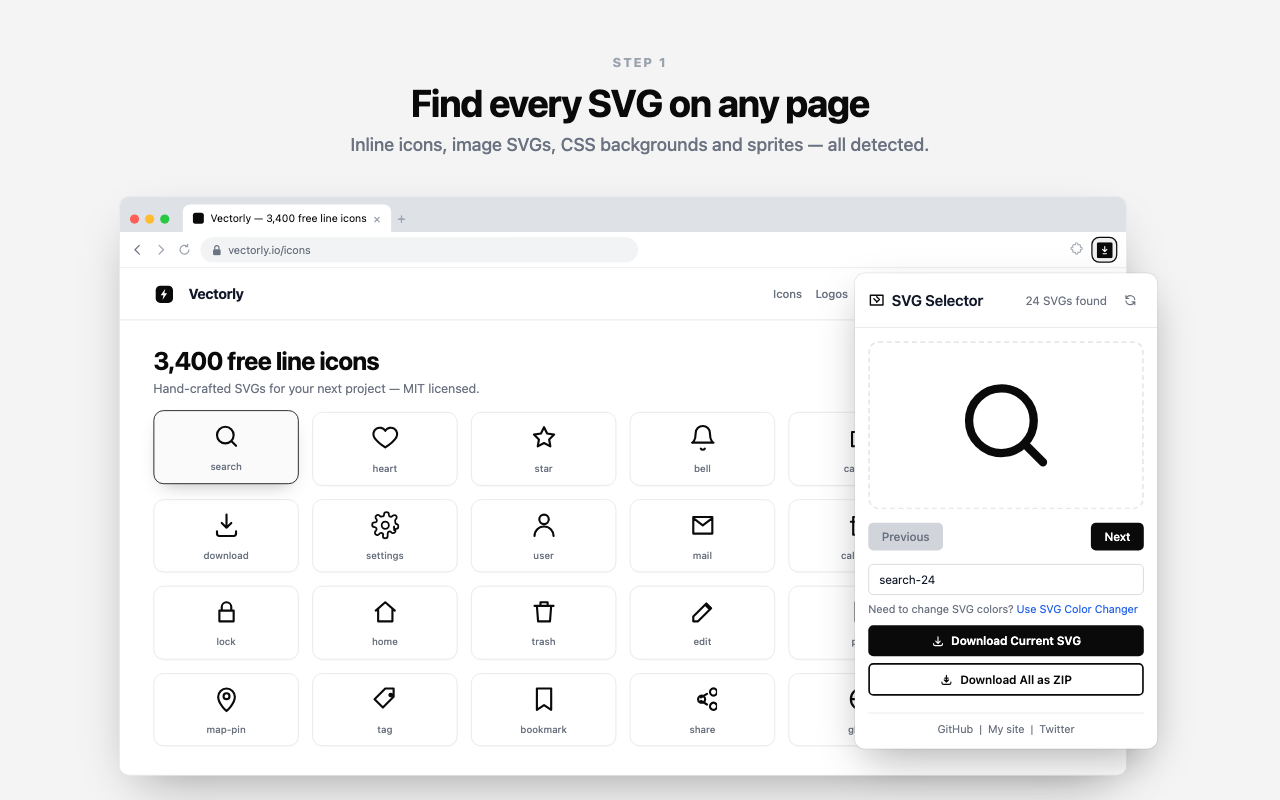
Extract the set — step by step
- Open the icon set page. Go to the view that actually renders the icons — a component gallery, a nav bar, a docs grid. Anything the page hasn't drawn yet isn't in the DOM, so make sure the set is on screen.
- Open the popup and scan. Click the toolbar icon. SVG Downloader detects the inline SVG icon components across the page and lists every one it finds.
- Page through the set. Use Previous and Next to move through the isolated previews and confirm what the page exposes. This is also your sanity check that the whole set is present before you export.
- Name the ones you want on their own. For a single icon, set the optional filename, then click Download Current SVG so it lands as
chevron-left.svgrather thandownload (3).svg. - Grab the whole set as a ZIP. Click Download All as ZIP. The icons come down at once, de-duplicated, and the popup's status line names anything that couldn't be resolved — see the ZIP guide for how that export behaves in detail.
Why the whole-set export is the fast path
The bulk ZIP feature is built for exactly this. Icon sets are full of repeats — the same arrow in a dozen menus, one logo in the header and footer — and a naïve grab would save each instance. SVG Downloader de-duplicates identical SVGs, so the archive reflects the real set: sixty renders might be forty unique icons, and that's what you get. Files are numbered in page order — svg-1.svg, svg-2.svg — so they unpack in the same sequence you paged through in the preview, and the svg prefix is yours to change in the extension's options.
What you can rely on
- Original vectors, not renders. Every file is the SVG that was in the page — its exact paths and
viewBox— so each icon stays sharp at any size and stays editable. - Namespaces repaired. The missing
xmlnsthat breaks copied inline SVG is added back, so every file in the ZIP opens in Figma, Illustrator and VS Code. - Nothing leaves your machine. The whole extraction runs on-device — no server, no account, no upload, no analytics.
- Best for
- Whole icon sets — galleries, nav bars, docs grids rendered as inline components.
- Two exits
- Download Current with a custom name, or Download All as ZIP for the set.
- De-duplicated
- Repeated icons are saved once, so the archive matches the true set.
- Related
- See inline SVG and whole-page ZIP.
Good to know
Frequently asked
How do I save an entire icon set, not one icon at a time?
Open the page that renders the set and click Download All as ZIP. The extension collects the SVGs it found on the page into one archive, de-duplicated, so a set of a few dozen icons comes down in a single click.
Will duplicate icons be saved twice?
No. The ZIP export de-duplicates identical SVGs, so a navigation arrow that appears in ten places is saved once. That keeps the archive clean and matches the true size of the set.
Can I control the filenames?
For a single icon, type the filename you want before you click Download Current SVG and the file saves under exactly that name. A ZIP is numbered instead — svg-1.svg, svg-2.svg in page order — and you can change the svg prefix to anything you like in the extension's options, so a set can land as acme-1.svg upward.
Does it only find inline icons, or hidden ones too?
It detects inline SVG components, CSS background icons, same-document sprite <use> references and <img> or <object> sources including data: URIs. If the icon is rendered on the page, it's in scope. Icons the page hasn't loaded yet won't appear until they do.
Are the extracted icons still editable vectors?
Yes. Each file is the original SVG markup with its paths and viewBox intact and the xmlns namespace repaired, so it opens and edits cleanly in Figma, Illustrator or a code editor.
Take the whole set in one click
Free, private, and it de-duplicates the set so you keep what matters.